


My Invisalign - Official App
3.51.51K Reviews
App Specs
- Version
- 6.8.1
- Updated On
- License
- Free
- Downloads
- 1,000,000+
- Developer
- Align Technology Inc.
- Categories
- Medical
- Platform
- Android, iOS
Screenshots
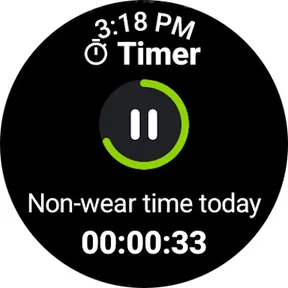
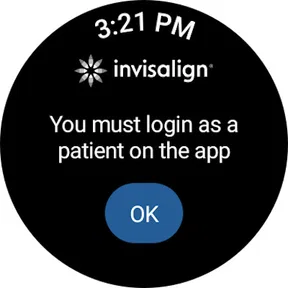
 Analysis by AppCompare
What I value most in a treatment companion is not a promise of a different smile; it is help keeping the small routine around treatment from slipping. That is the angle I’d use to judge My Invisalign - Official App: it is a free medical app from Align Technology Inc. built around reminders, progress photos, and answers to common questions. For someone wearing aligners, those modest jobs can matter more than a long list of extras, because treatment depends on sticking with the plan day after day.
A small routine can make aligner treatment easier to manage
Aligner care has a repetitive rhythm: remember where you are in the sequence, keep up with the schedule your clinician gave you, and notice how things are changing. The app’s reminders and photo-taking tools are useful precisely because they can support that routine without asking you to turn every day into a project. I see the strongest case for it as a personal organizer, not as a replacement for professional care or a way to decide independently when to change trays.
That distinction is important. A reminder can nudge you to follow the schedule you already have, but it cannot judge whether a tray fits as expected or whether a new symptom needs attention. I would use the app to make the agreed plan easier to remember, while treating my orthodontist as the person to contact when something about my teeth or treatment seems wrong.
Photos are more useful when you take them consistently
Progress photos can be easy to dismiss when you see your smile in the mirror every day. Their value comes from comparison over time: a picture taken in similar lighting and from a similar angle is easier to judge against an earlier one than a casual selfie taken under different conditions. If you use this feature, I’d make a simple habit of choosing a familiar spot, facing the same direction, and taking the photo at a calm moment rather than rushing between errands.
That kind of consistency helps you notice gradual changes without expecting every image to show a dramatic difference. It also keeps the photos in perspective: they can help you look back at your own progress, but they are not a clinical assessment. If a picture raises a concern, it makes sense to bring that concern to your provider rather than relying on a visual comparison alone.
Use reminders as prompts, not as treatment instructions
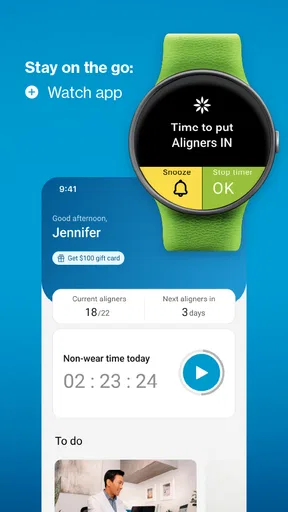
For a busy person, a notification can be a helpful cue at the right moment. I’d pair reminders with an existing daily anchor, such as checking my calendar or preparing for bed, so the app supports a routine I already have instead of becoming another thing I have to remember to open. If your schedule changes, the useful question is whether the reminder still matches the plan your clinician set, not whether you should adjust treatment just to satisfy an alert.
This is also where expectations matter. A phone can remind you, but it cannot make a routine happen; notifications can be missed, muted, or buried among other alerts. I would keep any instructions from the orthodontist available separately and treat the app as a convenient prompt. That approach is more dependable than assuming a notification is a substitute for knowing the plan.
Worth Reading Before You Choose

EA SPORTS FC Mobile 26 Is a Bigger Football Game, but It Takes Time

Flipboard Shows What News Apps Must Do Beyond the Feed

Switching to Android Auto Means Rethinking Your Driving Routine

Google Calendar Makes a Crowded Week Easier to Manage

Ludo King Makes the Most of the Minutes Between Plans

Baby Panda World Brings Quick Play to Modern Phones, but Its Game Library Feels Busy
Getting Started with Your Virtual Orthodontist
First things first, downloading the My Invisalign - Official App is a breeze. Available for both Android and iOS, it’s a simple tap away in the app store. Once installed, the app greets you with a user-friendly interface that even your grandma could navigate. Setting up your profile is quick, and connecting it to your Invisalign treatment is seamless. You just enter your treatment details, and voilà, you’re good to go!
Because the app is tied to a specific aligner treatment, it makes the most sense for someone who is already working with an Invisalign provider and wants a dedicated place for treatment-related prompts and photos. Before depending on it, I’d check that the account is set up correctly and that any reminders reflect the schedule you were given. If you are still comparing orthodontic options, it is not a general tool for evaluating every kind of treatment; your clinician is better placed to discuss which approach suits your teeth and circumstances.
Tracking Your Smile Progress
The app’s main feature is its ability to track your aligner progress. It’s like having your orthodontist in your pocket! You can set reminders for when to switch aligners, ensuring you’re always on track. The app even lets you log each aligner change, so you never lose track of where you are in your treatment. It’s a lifesaver for the forgetful folks among us.
In everyday use, a log is most helpful when life interrupts your routine. Imagine you are away for a weekend and cannot immediately remember whether you changed trays before leaving. A record can help you reconstruct what you did instead of relying on a vague memory. I would still check that against the schedule from my orthodontist if I had any doubt; the point of a log is to keep track, not to authorize a change in treatment timing.
There is a trade-off between recording every detail and keeping the habit simple enough to maintain. If you find yourself repeatedly forgetting to log a change, entering it at the same time you make the change may be easier than trying to catch up later. A missed entry does not necessarily mean the treatment itself has gone off course, but guessing at dates can create confusion, so I’d rather make a brief note promptly than build a complicated tracking routine.
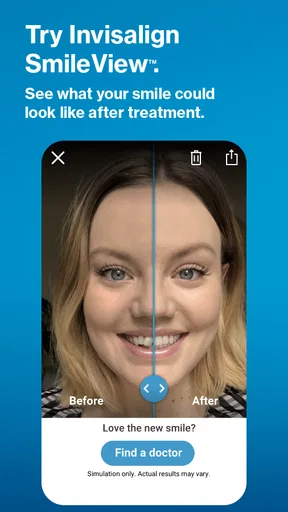
But wait, there’s more! The app provides a visual timeline of your treatment. This means you can literally see your smile transform week by week. It’s incredibly motivating to see how far you’ve come and how much closer you are to that perfect smile.
I would approach a timeline as a broad view rather than a guarantee that every stage will look or feel exactly as expected. Teeth move gradually, and day-to-day changes can be subtle; a photo taken under different conditions may also make progress look larger or smaller than it is. The practical benefit is having a record to look back on and discuss, especially if you want to explain a concern at an appointment.
Tips, Tricks, and More
Beyond just tracking, the app is packed with tips and tricks to help you care for your aligners and teeth. Whether it’s advice on cleaning your trays or handling discomfort, the app has a plethora of resources. It’s like having a personal dental coach cheering you on!
Those resources can be handy when you want a quick reminder of routine care, but I would not treat general guidance as a diagnosis. A tray that feels uncomfortable at first is different from a persistent or worrying problem, and an app cannot examine your mouth. If a symptom seems unusual or does not settle, I would contact the dental professional overseeing treatment rather than searching for a workaround in general tips.
The app’s question-and-answer role is useful for the small uncertainties that arise between visits, especially when you want to check a basic point without digging through old messages. For anything involving pain, fit, or a change in your treatment plan, though, I would seek advice from the clinician responsible for my care. That boundary makes the app more useful, not less: it can help organize routine information while leaving clinical decisions where they belong.
Plus, the community feature is a gem. You can connect with other Invisalign users, share experiences, and find support from people who are on the same journey as you. It’s reassuring to know you’re not alone, and you might even pick up some handy hacks from fellow users.
I’d take community advice as personal experience, not as instructions that automatically apply to my own treatment. Two people can have different schedules and different responses, so a tip that worked for one person may not be right for another. The most constructive use is encouragement and practical conversation; when someone’s suggestion conflicts with advice from your orthodontist, I would follow the professional plan and ask about the difference.
Staying Connected with Your Orthodontist
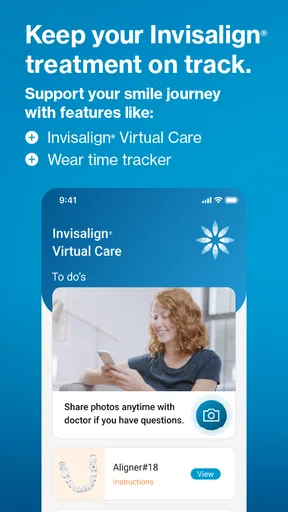
One of the standout features is the ability to communicate with your orthodontist directly through the app. Need to ask a quick question or send a photo for advice? The app makes it easy. It bridges the gap between appointments, so you’re always in the loop. No more waiting weeks to get an answer to a simple question!
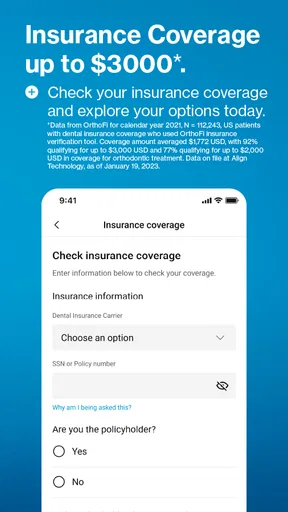
The key practical question is whether your own provider uses the communication options available to you, so I would check that when setting things up rather than assuming every clinic handles messages the same way. If the channel is available, a concise message with a clear description of the issue is more useful than a vague note. For something urgent or time-sensitive, I would use the contact method the clinic has told me to use instead of assuming an in-app message will be seen immediately.
And if you’re someone who loves data, the app’s treatment summary provides a detailed overview of your progress. It’s all there, from your start date to your projected end date, making it easy to stay informed about every aspect of your treatment.
I’d use a summary as a convenient reference, not as a promise that the projected timing cannot change. Treatment is personal, and the clinician managing it is the right person to interpret progress or explain a revised plan. If you are someone who prefers a paper calendar or a basic reminder app, those can handle simple dates too; the advantage here is keeping treatment-related information and progress photos together rather than scattering them among general notes and camera images.
Who benefits most from having it on their phone
The app is a better fit for people who want treatment-specific organization than for those who already have a reliable routine and prefer to keep everything offline. I can see it helping a first-time aligner wearer who is adjusting to a sequence of changes, someone with a busy week who wants prompts, or anyone who finds it reassuring to review photos over time. Someone who wants a medical app to make decisions for them, replace appointments, or provide an independent second opinion should look elsewhere and speak directly with a qualified provider.
Compared with a generic calendar, a treatment-focused app has a more relevant context for reminders and progress records. A calendar may be enough if all you need is a date alert, while ordinary camera albums can store photos but may make it harder to keep a treatment record organized. Neither alternative gives you professional judgment; that still comes from your clinician. I’d choose the simplest setup I can maintain, and use this app if having the Invisalign-related pieces in one place genuinely makes the routine easier.
Final Thoughts
So, is the My Invisalign - Official App worth it? Absolutely! It’s more than just an app; it’s a comprehensive tool that makes managing your Invisalign treatment easier and more engaging. From tracking progress to connecting with your orthodontist, it covers all bases.
I’d describe it more cautiously as a focused companion than a complete treatment tool. Its central value is helping you stay organized with reminders and progress photos, while its usefulness for communication depends on how your provider works with it. It is free, has an Everyone age rating, and has reached over a million installs. Its average rating is 3.6 from around 15,000 ratings, with about 1,500 written reviews, which suggests people have had mixed experiences rather than universal satisfaction. I would weigh that alongside my own needs: a reminder-and-photo routine can be worthwhile, but it will not suit everyone.
If you’re embarking on your Invisalign journey or are already deep into it, this app is a must-have. It keeps you organized, informed, and motivated—everything you need to ensure your smile journey is as smooth as possible. So go ahead, download it, and let it be the trusty companion you didn’t know you needed!
My own recommendation is more specific: try it if you want a simple treatment-centered place to support habits you already intend to follow, and judge it by whether those prompts and records make your week easier. Skip it if you expect it to replace your orthodontist, if you do not want another app in your routine, or if a plain calendar already does the job. For the right person, its value is not that it changes the treatment; it is that it can make the everyday parts of keeping up with treatment feel less scattered.
Pros
- User-friendly interface for easy navigation.
- Customizable reminders for appointments.
- Access to detailed treatment progress.
- Secure communication with your dentist.
- Supports multiple languages for global users.
Cons
- Limited features without a dentist account.
- Some users report occasional app crashes.
- Requires internet for most functionalities.
- Notifications can be overly frequent.
- No offline access to treatment plans.
FAQs for My Invisalign - Official App
What is the main purpose of the My Invisalign app?
The My Invisalign app is designed to enhance the Invisalign orthodontic treatment experience by providing users with tools to track their progress, manage appointments, and receive reminders. It also offers educational content about the treatment process and allows users to share their journey with friends and family.
How can I track my treatment progress using the app?
The app includes a treatment tracker that lets users upload photos of their teeth to visually monitor their progress. This feature helps users see changes over time and ensures they stay on track with their treatment schedule. It also includes reminders for changing aligners and attending appointments.
Does the app offer any support or educational resources?
Yes, My Invisalign provides a wealth of educational resources about the Invisalign treatment, including FAQs, tips for getting the most out of the aligners, and what to expect during the treatment process. Users can access support directly from the app for any questions or concerns they might have.
Can I manage my appointments through the My Invisalign app?
Absolutely. The app allows users to schedule and manage appointments with their Invisalign provider. It sends notifications for upcoming appointments and allows you to reschedule or cancel if necessary, making it easier to organize your treatment plan effectively.
Is the My Invisalign app free to use, and where can I download it?
The My Invisalign app is free to download and use. It is available on both the Google Play Store for Android devices and the Apple App Store for iOS devices. Users need to create an account or log in to access all the features tailored to support their Invisalign treatment journey.


